Necklines
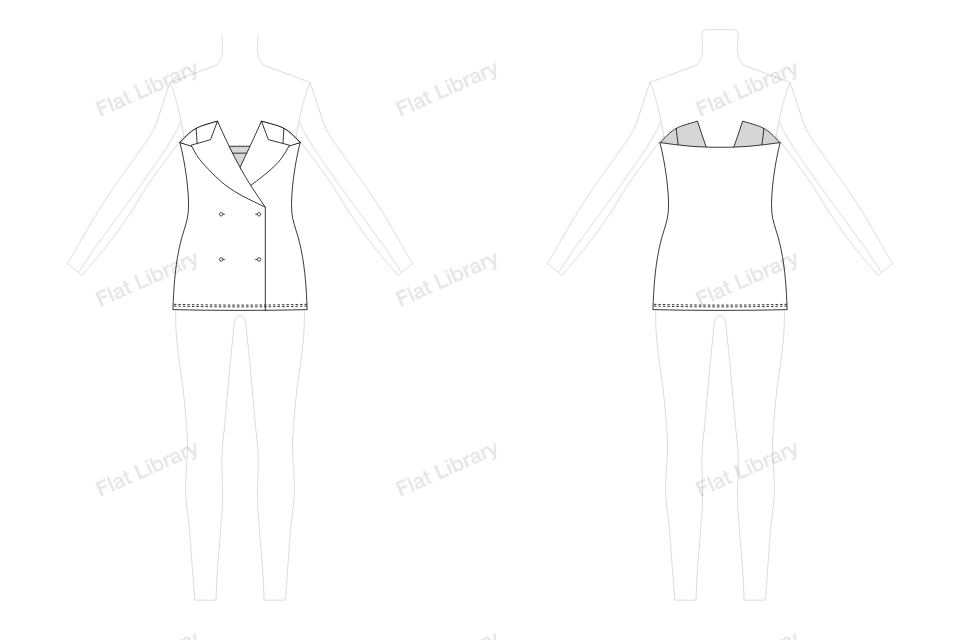
Strapless, Standing Peak Lapels
A peak lapel points upward toward the shoulder, for a sharper, more formal look. This one is the Strapless, Standing Peak Lapels, with its own details and proportions.
- Views
- Front and back, drawn together
- Named layers
- Inside Back, Body, Lapel Back R, Lapel Back L, Stand R, Stand L and Lapel R and 2 more
- Anchors
- 83 on the front, only where a line turns
- File
- Editable vector in Adobe Illustrator
How to draw a strapless, standing peak lapels flat in Illustrator
- Open Flat Library in Adobe Illustrator and go to Tops or Dresses, then Neckline.
- Choose Strapless, Standing Peak Lapels from the pictures. It is drawn on the template, front and back.
- Pull the blue points to change its length, width, neck and sleeve. The front and back redraw together, and the figure stops you going too tight.
- Insert it into your document as clean, named layers, and keep working by hand.
More necklines
Biker Lapels, Asymmetric ZipStrapless Corset, Flared TopStrapless, Wide Band NeckStrapless, Narrow Plunge NeckStrapless, V-Notch NeckStrapless, Crossed Pleats NeckEnormous Bow, Strapless NeckSurplice Shawl WrapPleated Neck BandCurved Sweetheart, Wide StrapsLow Scoop, Soft Folds NeckGathered to a Neck Tab, Open U Back