Install guide
Install Flat Library
It takes about a minute, and you do it all from inside Illustrator. You need Adobe Illustrator on a Mac.
Open the zip you downloaded
Double-click it. You'll get a folder called Flat Library, usually in your Downloads folder.
In Illustrator, go to File › Scripts › Other Script…
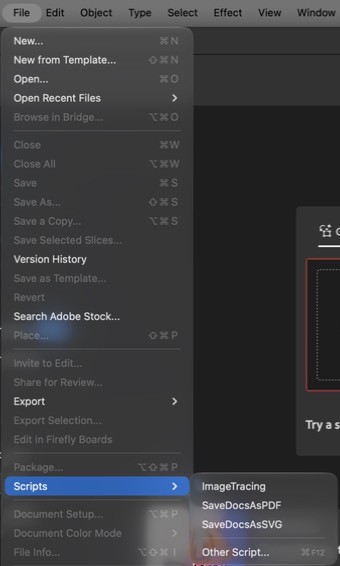
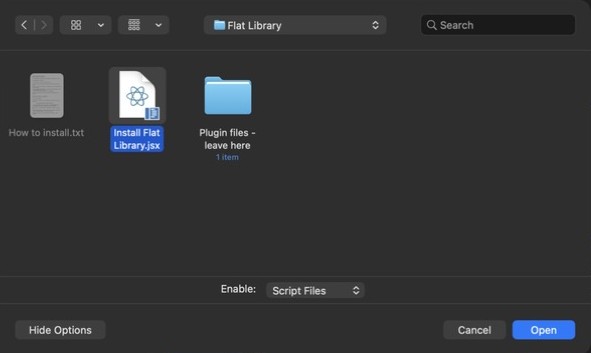
Choose Install Flat Library, then click Open
Find the Flat Library folder and open it. Install Flat Library is the only file you can choose. If your Mac asks to let Illustrator open files in Downloads, click Allow.
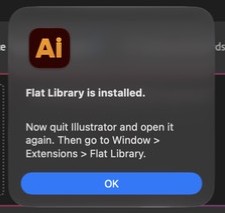
Quit Illustrator and open it again
You'll see this message. Click OK, then quit Illustrator completely and reopen it.
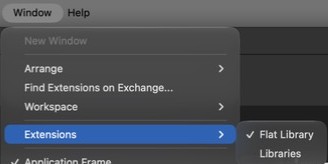
Go to Window › Extensions › Flat Library
Sign in with the email you bought it with
We'll email you a 6-digit code. There's no password. Then you're ready to draw.

If something doesn't go to plan
I double-clicked the installer and nothing happened
It only runs from inside Illustrator. Go to File › Scripts › Other Script… and choose it there.
I can't find Install Flat Library
Make sure you've opened the zip first, then look inside the Flat Library folder, usually in Downloads. Keep everything in that folder together until it's installed.
It isn't under Window › Extensions
Illustrator has to quit completely, not just close the document. Press Command-Q, open it again and look once more. If it still isn't there, run the installer again.
The code hasn't arrived
Check your spam folder, and make sure you used the email you bought Flat Library with. The code lasts 10 minutes, and the panel can send a new one.
How do I put it on another computer?
Sign in on your account page on that computer, download it and follow the same steps. You can use Flat Library on two devices, and remove one from your account page to make room.
How do I update it?
Follow the same steps with the new download. It replaces the old version.
I'd rather drag it in myself
- Quit Illustrator.
- In Finder, choose Go › Go to Folder, paste
~/Library/Application Support/Adobe/CEPand press Return. If it isn't found, go to~/Library/Application Support/Adobeand make a new folder calledCEP. - If there's no folder called
extensionsinside it, make one. - In the Flat Library folder, open Plugin files - leave here and drag com.illustratorcad.panel into
extensions. - Open Illustrator and go to Window › Extensions › Flat Library.